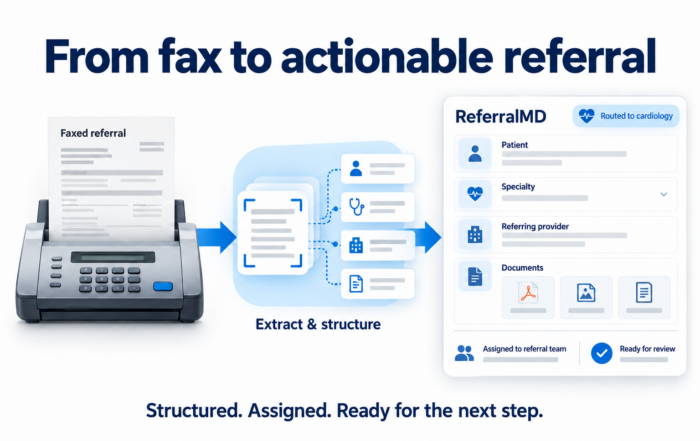
Electronic referral management works best when incoming faxes become structured, owned work rather than documents someone has to read, retype, and chase. Automating data capture, routing, missing-information requests, and the scheduling handoff cuts repetitive handling and shows every team exactly what each referral needs next.
A referral arrives by fax. Someone opens it, checks the patient’s details, retypes them into another system, and forwards the documents to scheduling. If something is missing, the referral waits while staff call the referring office. Later, someone else checks whether the patient was ever contacted.
Each step is routine. Together, they make referral processing depend on repeated manual attention, and every handoff is a place where a referral can stall.
ReferralMD doesn’t stop at tracking those referrals. SmartFax AI turns incoming faxes into structured referrals, and the referral management platform routes them, flags what’s missing, and hands ready referrals to scheduling. Referral partners keep faxing. Your team stops processing faxes by hand.
Key takeaways
- A digital fax inbox is not electronic referral management. The real gains come from what happens after a fax is received.
- Automate in sequence: capture, routing and ownership, missing-information tasks, the scheduling handoff, then status updates and escalation.
- Referring offices don’t need to change how they send referrals.
- Measure receipt-to-ready time, manual touches, and queue aging, not just completed referrals.
What is electronic referral management?
Electronic referral management is the digital coordination of a patient referral from receipt through review, scheduling, and follow-up. A useful workflow records each referral’s status, responsible team, supporting documents, and next action, so staff can see exactly where progress has stopped.
A faxed referral becomes part of electronic referral management once its information is captured in a structured referral record and connected to tasks, routing, and communication. The sending office can keep faxing while the receiving team changes how the referral is processed.
Where manual fax steps slow referral processing
A digital fax inbox makes documents available electronically, but staff may still read, sort, retype, assign, and chase every referral. To find the best automation opportunities, follow a single referral through the work that happens after receipt.
| Manual step | Targeted automation | Operational benefit |
|---|---|---|
| Read and sort incoming documents | Classify documents and capture referral information | Less repeated document handling |
| Retype patient and referral details | Create a structured record and validate required fields | Less duplicate entry; clearer exceptions |
| Forward documents between departments | Route referrals using defined rules | A clear destination and responsible team |
| Call to request missing records | Trigger requests and track outstanding items | Visible reasons for delays |
| Check whether scheduling has started | Trigger outreach when prerequisites are met | A more consistent scheduling handoff |
| Answer repeated status questions | Share workflow updates and flag overdue actions | Fewer status checks and better coordination |
The goal is to shorten the time between actions and make unfinished work visible. Faster document processing has limited value if the referral then sits in an unassigned queue.
Five ways to automate fax-based referral workflows
1. Turn incoming faxes into actionable referral records
Start with the information teams enter over and over: patient demographics, referring provider, requested service, insurance, and supporting documents. Define the fields each referral type requires, plus a review path for unclear or conflicting information.
ReferralMD SmartFax AI classifies incoming faxes, extracts referral information, matches patients, and creates structured digital referrals. Its value comes from connecting that captured information to the work that follows, including routing and requests for missing data.
Start here: Pick one high-volume referral type. Document its required fields and decide which exceptions need staff review before the referral advances.
2. Route every referral to a responsible team
Automatic routing helps when staff spend time deciding which inbox or department should receive a referral. Build rules on operational factors such as requested specialty, service, location, and provider availability, and give unmatched referrals a designated review destination.
For example, a multi-location practice can route a referral to the right scheduling team once the requested service and location are confirmed. A referral with an unclear service request goes to a review queue that has a named owner.
Start here: Write a destination rule and a fallback rule for each referral category. Every handoff should name who owns the next action.
3. Make missing information a visible task
A referral awaiting records can disappear into a general “pending” queue. Instead, name the specific blocker, assign someone to resolve it, and set a follow-up deadline.
Depending on the service and your organization’s requirements, blockers might include an unsigned order, missing clinical records, or an authorization that needs review. Automated requests and reminders handle routine follow-up, while staff focus on ambiguous responses and exceptions.
Start here: Replace the vague “pending” label with actionable reasons such as “awaiting signed order” or “awaiting referring-office response.”
4. Connect ready referrals to scheduling
Once a referral meets your requirements for scheduling, the workflow should trigger a defined next step: a scheduling task, patient outreach, or an automated scheduling conversation.
ReferralMD’s Voice AI Scheduling Agent handles incoming and outgoing scheduling calls, follows customer-defined booking rules and real-time availability, and can book appointments directly into an integrated EHR, practice management system, or scheduling system. What it can do depends on the configured integration and scheduling rules.
Start here: Define what “ready to schedule” means, when outreach should begin, and when unsuccessful contact attempts return to staff.
5. Share status and escalate stalled work
Visibility only improves coordination when it helps someone act. A referral record should show what has happened, what is unresolved, and who owns the next step.
ReferralMD’s referral management platform provides centralized referral tracking, configurable workflows, tasks, alerts, and provider updates, so teams can coordinate handoffs and spot referrals that need attention.
Start here: Define consistent statuses and escalation rules. Keep “scheduled,” “visit completed,” and “consult documentation returned” distinct so everyone knows which milestone has actually been reached.
What an automated referral workflow looks like in practice
Consider a specialty practice that receives a faxed referral with patient details and an order, but without a required supporting report. This is an illustrative workflow, not a measured customer result.
- Capture: The incoming fax becomes a referral record with its supporting documents attached.
- Validate: The workflow identifies the missing report and flags the referral for follow-up.
- Assign: A responsible team receives the outstanding-information task.
- Request: A configured communication asks the referring office for the report.
- Advance: Once the report arrives and required review is complete, the referral moves to scheduling.
- Coordinate: The appointment status is recorded and shared through the configured communication process.
Staff can see the blocker the whole time. The referring office gets a clear request. The scheduling team receives work only when it is ready.
Common mistakes that limit referral automation
- Automating capture but leaving routing manual. Records get created faster, then wait in an unassigned queue.
- Using a single catch-all “pending” status. Nobody can tell what is blocking a referral or who should fix it.
- Skipping exception handling. Decide upfront which referrals go to human review and who reviews them.
- Measuring only completed referrals. A growing backlog can hide behind faster completion times.
How to measure whether referral automation is working
Establish a baseline before you change the workflow. Compare similar referral types, locations, and volumes, and separate administrative processing time from the wait for an available appointment.
| Metric | What to measure |
|---|---|
| Receipt-to-ready time | Time from referral receipt until required intake and review steps are complete |
| Ready-to-first-contact time | Time from scheduling readiness to the first patient outreach attempt |
| Manual touches per referral | Staff actions required to process and coordinate each referral |
| Queue aging | Time spent in each status, with the reason for delay |
| Scheduling conversion | Share of a defined cohort of received referrals that reaches a booked appointment within a stated period |
| Exception and correction rates | How often referrals require review, reassignment, or data correction |
Track both the median processing time and the slowest cases, such as the 90th percentile. Review unresolved referrals alongside completed ones. For more ideas, see 7 Referral Management Metrics That Drive Practice Growth.
A clear path to faster referral processing
Begin with the step that creates the most repeated work. Automate capture, establish routing and ownership, make missing information actionable, and connect ready referrals to scheduling. Expand once your team has verified the workflow and reviewed its exceptions.
ReferralMD connects SmartFax AI with referral management and scheduling, so incoming faxes become coordinated work while referral partners keep using the sending process they already have.
Move referrals forward with less manual handling
We’ll map your fax-to-referral workflow and show where targeted automation helps your team process referrals faster.
Frequently asked questions
How does fax automation improve electronic referral management?
Fax automation captures information from incoming documents and connects it to referral records, routing, and follow-up tasks. This reduces repetitive handling and shows teams what each referral needs before it can advance.
Can healthcare organizations automate referrals without asking partners to stop faxing?
Yes. ReferralMD SmartFax AI receives incoming faxes and turns them into structured referrals. Sending organizations keep faxing while the receiving team uses a digital workflow to process and coordinate each referral.
Is ReferralMD just a referral tracking tool?
No. ReferralMD tracks referrals, but it also creates them from incoming faxes with SmartFax AI, routes them using configured rules, supports missing-information follow-up, and hands ready referrals to scheduling, including through its Voice AI Scheduling Agent where integrations are configured.
What is the difference between OCR and referral workflow automation?
Optical character recognition (OCR) converts document images into machine-readable text. Referral workflow automation uses that captured information and configured rules to advance work, such as assigning a referral, requesting records, or triggering scheduling.
Which referral steps should a practice automate first?
Start with frequent, repeatable administrative steps: document classification, data capture, queue assignment, and reminders. Define required information, ownership, and exception handling before connecting those steps to scheduling.
Does faster referral processing mean a faster appointment?
Faster processing reduces administrative delays before scheduling. Appointment timing also depends on provider capacity, required reviews, authorization, and patient availability, so measure processing speed and appointment access separately.
Related Posts



Subscribe to Our Blog
Recent Posts